


PUBLIC PAGES
Keep your marketing pages open.
Give your blog or landing pages a public rule so visitors can read them without browser verification.
/blog*
Public route
Getting things ready…
YOUR WEBSITE. YOUR RULES.
Check requests before protected pages or API data leave your server. Block detected automation, require browser verification and limit repeated access with rules you control. Keep your hosting and domain.
No card required Manage from your phone or computer
Your rules. Every request.
SEE IT IN ACTION
Start with bot protection and AI scraping controls, then see how to set up your guard, share private previews and review access reports.
INSIDE YOUR WORKSPACE
Update route and country rules, review traffic and switch between sites from your phone, tablet or computer. Once your compatible server guard is configured, just sign in to your dashboard. No mobile app needed.
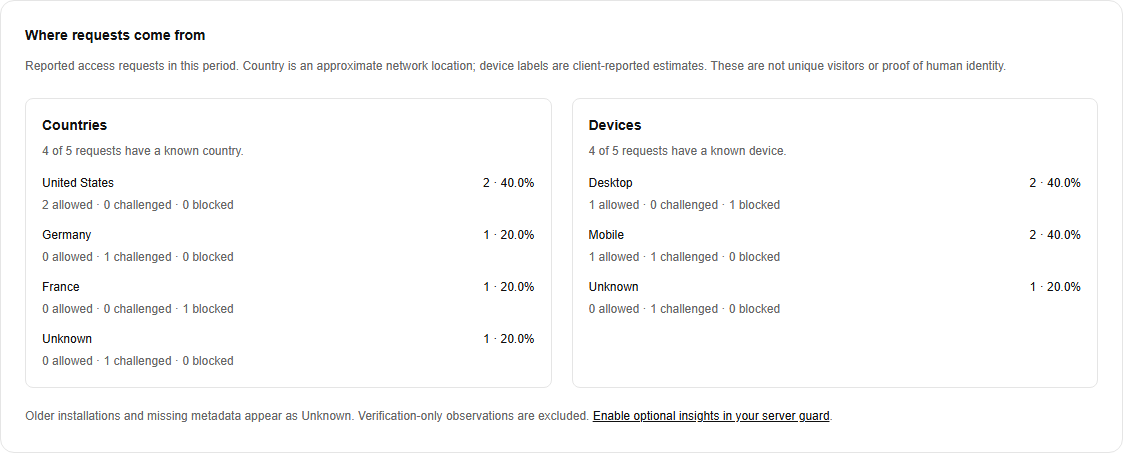
See country and device breakdowns alongside access decisions. Follow a country into Event explorer to review matching requests. Missing data stays visible as Unknown.
Screenshots use sample data. Country and device insights are optional; country features need a compatible guard and configured hosting source. Location is approximate, and proxies or VPNs can change it. Excel downloads are available on active Growth and Ultimate plans.
BEHIND THE FLOW
Your server checks the request against your access policy before sending protected content. You decide what stays open, what needs verification and what stays closed. Optional country rules apply first on requests reaching your guard.
Denied requests do not receive protected content. Checks apply to paths covered by your server guard; protect related APIs and downloads too.
PROTECTION RUNS ON YOUR SERVER
Use the Next.js 16 App Router SDK or the JavaScript SDK on a Node.js 22+ server. A browser-only installation cannot protect content before it is served.
Framework examples below require a supported server setup.
Frontend frameworks connect through a supported server integration.
Find your integrationWHERE IT FITS
PUBLIC PAGES
Give your blog or landing pages a public rule so visitors can read them without browser verification.
/blog*
Public route
SELECTED ROUTES
Choose an automatic check or an optional Verify to continue checkbox. Protect the APIs those pages call with their own verified-session rules.
/research*
Automatic browser flow
SEVERAL WEBSITES
Switch between connected sites, adjust their route rules and review reported requests without maintaining a separate dashboard for each.
Your websites
Separate rules and activity
PRIVATE CLIENT PREVIEWS
Send your client a normal link and a separate password. No client account needed. An unlock lasts up to 12 hours in that browser; saving preview settings revokes previous unlocks.
Whole website or selected routes
Shared preview password
REQUEST LIMITS
Reduce rapid refreshes, repeated API polling and scraping bursts with route limits. People sharing a network share the allowance. Requires trusted Vercel network protection.
Requests per minute + burst
Allowance shared per network
DATA AND ACTION BUDGETS
Reserve units before verified requests receive protected data. Your application enforces the declared maximum. Requires a server cost callback and trusted Vercel network protection.
Records returned or actions performed
Your server defines the cost
Features require a compatible, configured server guard and protect only requests it covers. Include related APIs and downloads; public files and cached copies outside the guard remain accessible. Browser verification does not replace login, membership checks or user permissions. Anyone with a shared preview password can use it.
Read the page and API guide01 / BEYOND CUSTOM MIDDLEWARE
Bring route and country rules, country and device insights, request history and private keys into one workspace.
Edit route actions and their order in your dashboard. Your installed guard uses the saved policy when it checks a request.
See reported countries and device categories alongside allow, challenge and block decisions. Filter requests and inspect the reasons behind them.
Block selected countries on guarded routes and choose what happens when location is unknown. Manage country rules from your dashboard.
Switch between websites, verify domains and manage private installation keys. Rotate or revoke a key when your setup changes.
02 / THE CONNECTION
Verify a domain, configure its server guard, then test a real request.
npm install @stopnetic/nextFor Next.js 16 App Router. Install in your existing Next.js project.
Choose the package manager your project already uses. Protection runs on your server before protected content is sent.
Before going live, test unavailable-service behavior. If the guard cannot authorize access, it withholds protected content. Protected routes also become unavailable when a trial or plan expires.
Add your website in Stopnetic and verify ownership with a DNS record.
Use your generated Site ID, private installation key and public signing key to connect the guard.
Choose public, challenged or blocked routes. Test your pages and APIs, then follow activity in your dashboard.
03 / ROOM TO GROW
Try core protection on one domain for 3 days.
No payment card. Your trial starts with your guard.
Regular monthly price €15
Offer price €9/ month
1 domain
One website. A clear place to start.
Regular monthly price €75
Offer price €29/ month
5 domains
More websites. One workspace.
Regular monthly price €150
Offer price €79/ month
Unlimited domains
Room for your whole portfolio.
Prices are in EUR, billed monthly. Applicable taxes may be added at checkout. Insights collection and country controls require a compatible, configured server guard. Detailed-event allowances are shared across each account; compact reported totals continue when detail recording is full. All plans use service request limits. A domain and its www address share one allowance; other subdomains count separately. Need more events? Explore one-time packs.
EXTRA EVENTS
Need more detailed request records? Add a one-time event pack whenever you need it, shared across all your sites.
€10
One-time payment
Additional detailed event credits for your existing paid protection plan.
View event pack€50
One-time payment
Additional detailed event credits for your existing paid protection plan.
View event packAn active paid plan is required to buy and use event credits. One credit stores one additional detailed event after your included allowance is used. Your plan’s history window still applies. Applicable taxes are shown at checkout. Manage credits in your workspace.
A FEW GOOD QUESTIONS
Clear boundaries start
with clear answers.
No. Your website stays with its current host. You install the Stopnetic guard on its server and connect it to your Stopnetic workspace.
Yes. Sign in to your dashboard from your phone, tablet or computer to update route rules, review traffic and manage connected sites, wherever you have internet access. No mobile app is needed. Install the guard on your website’s server first; then manage it from your browser.
Use @stopnetic/next for Next.js 16 App Router, or @stopnetic/js with a Node.js 22+ server for React, Angular, Vue, Svelte, Nuxt, SvelteKit, Solid, SolidStart, React Router, Astro and plain JavaScript or TypeScript. Framework examples are included in the setup guides. Keep your existing SSR or static frontend; protection must run on a supported server before protected pages and API responses are sent.
Yes. Both SDKs are npm registry packages: use npm install, yarn add, pnpm add or bun add. Choose your application and package manager in the install example above. Bun can install the package; the guard still runs on its supported Node.js runtime.
Your server guard checks requests before protected pages and API responses are sent. Enable automation checks to block detected signals, require browser verification on selected pages, and set request or data budgets to limit repeated access. Denied requests do not receive protected content. Browser verification is one layer, not a guarantee that every automated request will be identified. Try Stopnetic free for 3 days on your own website and review the results in your dashboard.
Yes. Enable optional traffic insights in a compatible server guard to see reported countries and broad device categories, then filter them in Event explorer. Country reporting needs a configured Vercel or Cloudflare source. Missing or older data appears as Unknown. These are access-request counts, not unique visitors or proof of someone’s identity.
Yes. With a compatible guard and configured hosting source, choose countries to block in Policies and decide whether Unknown locations follow route rules or are blocked. Country blocks run before public route rules and verified sessions on requests reaching the guard. Location is approximate and VPNs can change it. Review your origin and cache coverage during setup; you can disable blocking through your separate Stopnetic dashboard.
Choose an automatic browser check or the optional interactive flow, where visitors select Verify to continue before the check starts. Both use a Stopnetic verification screen and continue to the requested page after a successful check, with a retry option if needed. Use a compatible SDK, enable the mode in its server configuration, then update and redeploy your guard before selecting it in Policies. JavaScript and cookies are required. Verification creates a browser-bound session; it does not establish a user identity.
Yes. Enable Private client preview for your whole guarded website or selected pages and routes, then share a normal link and a separate password. No client account is needed. A successful unlock lasts up to 12 hours in that browser. Saving preview settings revokes previous unlocks; leave replacement password fields empty to keep the saved password. Anyone with the password can use or forward it. A compatible guard must cover the pages, APIs and downloads you want private; public files and cached copies outside the guard remain outside this protection.
No. Each configured route rule shares its allowance per network, including new cookies and verified browser sessions. Set a sustained requests-per-minute rate and a burst capacity for short peaks. This helps reduce rapid refreshes, repeated API polling and scraping bursts before the application handler runs. People sharing a network share the allowance; slow or distributed traffic can stay below it. Deploy the required trusted Vercel network protection before enabling a limit.
A request limit counts calls. A data or action budget counts a maximum cost defined by your server, such as records returned or actions performed. Verified requests reserve units before protected data is sent. Your application must enforce the declared maximum cost. These budgets require a compatible server guard, trusted Vercel network protection and a server cost callback. Allowances are shared per network across the rule, and requests larger than the burst capacity cannot fit.
Active Growth and Ultimate plans include Excel downloads for traffic summaries and Event explorer. Export the current page or matching filtered requests, including available country and device fields, within the plan’s history and export limits. Starter includes dashboard reporting without Excel downloads.
Create an account without a payment card, connect one domain and install your guard. Your 72-hour trial starts with the first valid request from that guard, so setup time does not use up your trial. Each domain gets one free trial; deleting a site or account does not reset it.
Protected routes become unavailable until access is renewed. Routes explicitly configured as public in your local guard stay available. You can still sign in to manage your account and billing.
No. Keep your existing login, membership checks and user permissions. Stopnetic controls route access and browser verification; a verified browser session does not establish a user identity or subscription entitlement in your application.
The guard withholds protected content when it cannot obtain a valid authorization response. Routes explicitly configured as public in your local guard stay available. Test this behavior before deployment and review the testing and errors section of the public setup guide.
YOUR NEXT REQUEST. YOUR DECISION.
No card required. No website move.